What We Heard and Showed at Informa Connect East: Hands-On AI for Clinical Finance


Key takeaways
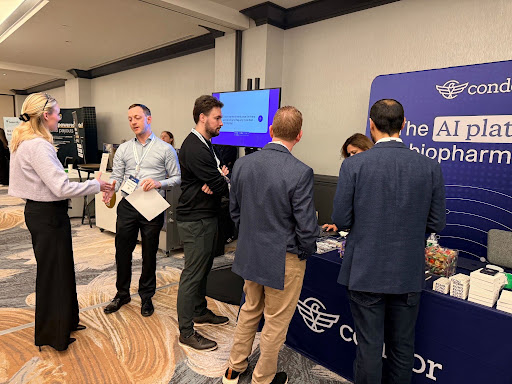
We had a great time at Informa Connect's Finance for Bioscience East in Boston last week. Thanks to everyone who stopped by the booth to see our new Clinical Finance AI Agent in action, joined us at the Red Sox game, and packed the room for our panel. We came home with a full notebook and a lot of energy.
What we heard at the show
Everyone knows they need AI. What's less clear is where to start and how to scale.
That came through in the room. When I polled the over 100 people who joined our panel session, roughly half said they're still figuring out where to start or how to scale. That matches what we saw in a recent Condor webinar, where 60% of attendees said they don't know where to begin.
We also noticed something else: there was noticeably less AI hype at the show this year, and attendees appreciated it. What people wanted instead were practical, hands-on examples of how AI can actually help clinical finance teams do their jobs.
Practical AI, live on stage
That's exactly what David Towslee at Intellia Therapeutics and I set out to deliver in our session, Navigating Clinical Trials Finance: Accruals, Automation and AI Integration. Instead of slides full of promises, we ran live demos using a tool nearly everyone in the room already had on their laptops: Microsoft Copilot.
Here's what we covered.
The bottleneck is moving from the lab to the ledger
We opened by setting the table. AI is evolving faster than enterprises can adopt it. Cloud software took 12 to 14 years to become embedded in everyday work; AI is moving in roughly 90-day cycles. Waiting for a steady state before you adopt isn't a strategy at all.
That pace matters for clinical finance in a specific way. AI has already accelerated drug discovery, which means more candidates are making it into the clinic. Each of those candidates becomes a clinical trial, and each trial becomes a stack of CRO contracts, vendor agreements, and site CTAs that land on the finance team. Many teams are still running on PDFs and spreadsheets built for a lower-volume world. If those processes don't evolve, clinical finance risks becoming the constraint instead of the accelerant.
David added that the demand he sees is for speed: faster scenario planning, faster answers for strategic decisions. "You don't have a month to run back and redo your whole model," he said. "You're going to need to turn this over in a day or two in some cases."
Use case #1: CRO change order analysis
Change orders are one of the most persistent pain points in clinical finance, and the numbers explain why. Protocols with at least one substantial amendment are up 19 points over the last decade, four out of five Phase 3 protocols are now amended, and the average trial sees 3.3 major amendments. Every amendment drives downstream vendor change orders, and the average Phase 3 vendor change order runs about $535,000. For a company with eight trials in the pipeline, that can mean 40 to 50 change orders and roughly $10 million in unplanned spend.
Meanwhile, change order volume has roughly doubled while finance team headcount has stayed flat. I built change order budgets earlier in my career at a CRO, and pointed to the negotiation asymmetry: vendors can spend months building a change order, then ask the sponsor to review it in a week.
David described how his team uses AI to push back on that asymmetry. They feed multiple contract versions into an LLM and ask for a concise summary of unit changes, price changes, adds, and deletes. "AI is not giving you the answer per se," he said. "But it points you right to where you need to look. There's the data. You just need to go tell the story now."
Then I ran a live demo, loading a sample Phase 3 change order into Copilot with this prompt:
I'm a finance director at a biotech company. I've received the attached change order budget from the CRO for a Phase 3 study. Please analyze it and give me: a summary of the total cost change and the top five largest cost increases; a breakdown of direct fees vs. pass-throughs vs. investigator costs; any line items that appear to be retrospective or cover work already performed; and a list of five questions I should ask the CRO before approving this. Format the output as a brief memo I can share with my CFO.
Within seconds, Copilot summarized the total cost change, identified the largest increases, flagged potentially retrospective work, and surfaced a telling commercial observation: site count was up 54% while patient count was unchanged. It also generated sharp questions for the CRO, including why monitoring costs were rising with no increase in patients.
Use case #2: Investigator grant review
Investigator grants are nearly half of per-trial costs (48%), averaging about $6,900 per patient, and on a large Phase 3 study they can generate tens or hundreds of thousands of line items. The stakes extend to sites, too: 43% of sites report having three months or less of cash on hand, and among sites that drop out of trials, 40% cite payment delays as the primary reason.
Part of the difficulty is structural. Activity data lives in EDC, IRT, and CTMS systems, while finance sees only CRO invoices. Every site contract is formatted differently. Protocol amendments reprice studies midstream. And invoiceables often accrue in the dark until they show up on a bill. I shared the story of a mid-cap oncology sponsor that received a $5 million bill for previously unreported invoiceables at trial closeout. Automation without reconciliation just makes the wrong payment happen faster.
David's team uses AI to sift through CRO payment reports: pulling out invoiceables, comparing month-over-month balances, summarizing by site and country, and checking billed amounts against contracted rates. "It's not necessarily a capability issue, it's just time," he said.
The second demo used a similar prompt on a sample investigator grant payment report, asking for total payments by site and month, a breakdown of visit payments vs. procedures vs. invoiceable pass-throughs, any payments inconsistent with site budgets or completed visits, an estimate of what to accrue for work performed but not yet paid, and five questions for the CRO. The output caught real exceptions, including a visit performed in December but not paid until May, and standalone ECG payments without an associated visit.
Where generic AI stops
David and I were candid about the limits. A generic LLM only knows what's in the document you give it. It isn't connected to your operational systems, so it doesn't know how many patients have enrolled or how many sites are active. It can't reliably spot unlabeled retroactive work without additional context. It caps how many documents you can upload at once, which rules out analyzing hundreds of site contracts. And it's non-deterministic: I ran the same prompt the day before and got a response that was similar, but not identical.
In finance and accounting, the numbers are the numbers. That 5% difference is where teams can get into trouble. Generic AI does a great job of getting you from zero to informed, but not to defensible.
David was equally direct. Don't let AI calculate numbers you'll report without validating them. Ask for check calculations, understand how it got there, and use it for directionality and noise reduction rather than final answers.
Key takeaways
- Start with work you've already done. David's advice for building confidence: pick a month you've already closed, build a prompt that recreates your manual analysis, and confirm it matches. Then run it on the next month.
- Use reverse prompting. Iterate with the LLM until the output is exactly what you want, then ask it to write the prompt that would get you there next time. Save it and reuse it.
- Build a shared prompt library. David's team spends about 10 minutes of every team meeting discussing how they're using AI, and maintains a library of common prompts, such as variance analyses, that anyone on the team can adapt.
- Make time to experiment. Our team runs quarterly hackathons: a few hours on a Friday afternoon to identify a problem, build an AI solution, and test it together.
- Try the in-app plugins. David's single recommendation for Monday: experiment with AI plugins in Word, Excel, and PowerPoint. Seeing changes happen live, and iterating in real time, is far faster than the old prompt-wait-revise loop.
- Check your AI policy first. Before putting confidential data into any tool, confirm it's licensed and approved by your IT team. Enterprise plans from the major providers generally don't train on your data; free tools may not offer the same protections.
- Weigh build vs. buy honestly. Homegrown tools can be tailored to your workflows but depend on IT bandwidth. Purpose-built platforms bring connected data, auditability, and rigorous security. The right answer depends on your resources and how far you want to go.
Helping the industry get started, and scale
The questions we heard in Boston are the ones we hear from R&D teams every week: Where do I start? How do I trust the output? How do I go from one-off prompts to something repeatable? Our goal is to keep answering them with practical, hands-on guidance that clinical finance teams can put to work right away, whether or not they're Condor customers.
A big thank you to David for joining Jeff on stage and sharing so openly, and to everyone who attended and asked great questions.
Go deeper
Here are the slides from our presentation. Once we get the recording from Informa, we’ll add that here too.
If you want to keep exploring practical applications of AI in clinical finance, start here: