
Jeff Jahnke
Director, Customer Operations, Condor
Articles

How to Manage CRO Change Orders and Control CRO Costs in Clinical Trials
For most biopharma sponsors, the CRO contract is the single largest commitment in a trial budget. But the number you sign is rarely the number you pay. Between the initial work order and study closeout, a steady stream of change orders reshapes the budget, and each one lands on the desks of clinical operations and finance teams who are already stretched thin.
Managing CRO costs well comes down to one question: when a change order arrives, can you tell what's legitimate and what isn't, fast enough to matter? This post walks through why that's so difficult, how teams have tried to solve it, and how Condor changes the equation with AI.
How to manage CRO costs in clinical trials
Controlling CRO spend isn't about a single negotiation at contract signing. It's a discipline that runs the full life of the study, and it rests on four habits:
- Anchor every cost to its driver. Every line in a CRO budget is ultimately a function of something operational: patients enrolled, sites activated, visits completed, months of study duration. When you know which driver moves which line item, you can tell whether a proposed increase actually follows from a scope change.
- Keep the original contract close. Unit prices, assumptions, and fee schedules in the original work order are your baseline. A change order should adjust scope, not quietly reprice work you've already agreed on.
- Track what's already been done. Work that has already been performed but not yet recognized is one of the most common sources of surprise costs. If you don't know where the study actually stands, you can't tell whether a change order is billing retroactively.
- Know what the change should cost before the CRO tells you. The strongest negotiating position is having your own independent number in hand. Without it, you're reacting to the CRO's figure instead of evaluating it.
These four habits are simple in principle, but hard in practice.
Why CRO change orders are so hard to manage
Change orders have gone from occasional to nearly universal. Protocol amendments - the main trigger for change orders - now affect about 76% of clinical trials, up from 57% a decade ago. In Phase 3, it's 82%, with an average of 3.3 substantial amendments per trial. The later the phase, the bigger the bill: a Phase 3 change order averages roughly $535,000, which is close to four times the Phase 2 average, and takes about three months to negotiate.
Scale that across a portfolio and the numbers get serious. A biotech running eight active studies can expect 40 to 50 change orders across its CROs and ancillary vendors, representing $10 million or more in unplanned, unbudgeted cost. Meanwhile, change order volume has roughly doubled over the past decade while finance headcount has stayed flat. That gap gets absorbed with overtime, missed forecasts, and long weekends.
Volume is only part of it. The documents themselves are built to be hard to review:
The incentives are misaligned. CROs sometimes lowball initial bids, counting on the change order process to recover margin. Once a trial is underway, switching CROs midstream is so costly that sponsors have little leverage.
The information is asymmetric. A change order can be in development at the CRO for months, then arrive with a request to approve it in a week or two. Line-item explanations are often a sentence or two, and unit price increases can be tangled up with legitimate scope changes.
Retroactive work is buried. It's not always clear which scoped work has already occurred. Even well-run CROs struggle to recognize out-of-scope work consistently, and on milestone contracts you may have no visibility into what's been performed. The result is often a large true-up bill at the end.
There's no system of record. Out-of-scope reporting is inconsistent, unit pricing varies across and within trials, and version control can be chaotic. It's not unusual for a CRO to accept a sponsor's pushback in one version, then revert the change in a later one without anyone catching it.
The internal mechanism of a CRO is highly manual and disaggregated. One group manages unit recognition, another builds change order budgets, and a third handles invoicing, often in systems that don't talk to each other. That's how a sponsor ends up billed for 300 remote monitoring visits when only 150 were budgeted.
How sponsors manage CRO change orders compounds the problem further.
How teams have managed CRO change orders to date
Most sponsors handle change orders with some combination of spreadsheets, trackers, and sheer effort. A finance or clinical ops lead exports the CRO budget grid, which can run to hundreds of line items, and works through it line by line, sometimes literally with a ruler, comparing it against the original contract and whatever out-of-scope tracker exists. Questions go back to the CRO by email, a revised version comes back, and the cycle repeats four or five times.
When sponsors want to know what a scope change might cost in advance, they typically ask the CRO. The process on the CRO side is often less rigorous than it looks. When Jeff was at a CRO, a sponsor asking what it would cost to add 15 patients or expand into new regions would get a modeled estimate with a 20% buffer on top, delivered as a single ballpark number a week or two later. The sponsor gets an answer, but it's the CRO's answer, on the CRO's timeline.
More recently, teams have started using generic AI tools like Microsoft Copilot or ChatGPT for a first pass. That's a genuine improvement. With a well-structured prompt, a generic model can summarize what changed in a change order, identify the largest cost increases, and draft a CFO-ready memo in under a minute, with no procurement required. (We shared the exact prompt in our webinar recap).
But generic AI hits a ceiling quickly. It can tell you what a document says, not whether it's right. It has no knowledge of your original contract, your protocol history, or what "normal" looks like for a study like yours. It won't reliably catch unlabeled retroactive work, and it can return a different answer every time you run the same prompt. It gets you from zero to informed. But it doesn't get you to defensible.
How to manage CRO change orders with Condor’s AI platform
Condor is the AI platform for biopharma R&D. It's built on a proprietary clinical and financial ontology and knowledge graph, co-developed with Big 4 accounting firms, that maps how budgets, vendor contracts, sites, and clinical activity actually connect. That foundation is what lets Condor's AI reason about a change order the way an experienced clinical finance team would.
Condor supports change order management two ways: reviewing change orders once they arrive, and getting ahead of them before they do.
Reviewing a change order: from "what changed" to "what's wrong"
When a change order comes in, Talon, Condor's purpose-built AI analysis service, evaluates every line item against the original contract and the study's cost drivers. Instead of just summarizing changes, it makes judgment calls. Each line is sorted into a clear disposition: hard no, push back, needs clarification, or accept.
In a live demo, we ran a $2.25 million Phase 3 change order through Talon, an internally built AI analysis platform used by our customer success team. It found that roughly 94% of the dollar delta was unjustified, inadequately supported, or needed clarification. It identified $1.4 to $1.7 million in recoverable savings, along with a realistic settlement range of $556,000 to $856,000, since no CRO concedes everything.
The reasoning is what makes it useful. The largest increase in that change order was clinical monitoring, which the CRO had scaled with the number of added sites. Talon flagged that monitoring cost is driven primarily by patient volume and source data verification, not site count. Since patient enrollment wasn't changing, most of that increase didn't hold up. Talon reverse-engineered the expected cost from the original contract's drivers, showed the gap, and linked every finding back to the source cell in the budget grid. It then produced a negotiation brief with talking points the team could send straight back to the CRO.
Getting ahead of the change order: scenario planning
The bigger shift is flipping the sequence entirely. With Condor's clinical finance agent, you can model a scope change yourself, in plain language, before the CRO sends anything.
In the same demo, we asked the agent to forecast a scenario that mirrored the CRO's proposed change: add sites, keep the 48-month duration, and hold patient counts flat. In seconds, the agent loaded the study's forecast, recalculated it against the actual contract structure and cost drivers, and saved it as a new scenario. The result was a $629,000 incremental increase across the full trial, compared to more than $2 million in the CRO's change order for the same scope.
That's the difference between reacting and negotiating. When you know what a reasonable change order looks like before it arrives, the conversation starts from your number, not the CRO's.
Scenario planning works for any what-if your team is weighing. Behind on enrollment? You can compare the cost of adding countries versus adding sites. Unsure what a realistic enrollment rate looks like? Condor can reference comparable trials on ClinicalTrials.gov with similar indications, size, and site mix to back into a reasonable assumption.
The benefits of managing CRO change orders with Condor
You recover real money. One commercial-stage pharma sponsor running 20 studies has saved more than $21 million in unjustified CRO billings in under two years with Condor. Across our customers, teams see up to 30% budget savings, alongside 90%+ forecast accuracy and 70% faster month-end close.
You negotiate from a position of strength. Scenario planning gives you an independent, defensible estimate before the CRO's number arrives. That reverses the information asymmetry that CROs have historically relied on.
Your findings are defensible. Condor's deterministic math layer produces consistent answers every time, with AI reasoning layered on top. Every finding traces back to its source. The platform includes a full audit trail of every change, whether made by a user or an agent, with SOX controls, sign-offs, and user permissions built in. Condor is SOC 1 Type 2 and SOC 2 Type 2 compliant.
You catch what's hidden. Line-item comparisons to the original contract, driver-level analysis, and retrospective flags surface the costs that generic tools miss, including unit price creep, retroactive billing, and increases that don't follow from the actual scope change.
You close the capacity gap. Change order volume has doubled while team sizes haven't. Condor absorbs the line-by-line review work so your team can spend its time on judgment and negotiation rather than untangling budget grids.
It extends beyond CROs. The same approach applies across your vendor portfolio, including labs, patient recruitment vendors, and site CTAs. Condor integrates directly with your ERP, EDC, contract, and procurement systems, so there's no need for special templates or manual data transformation.
Stop reacting to change orders
Protocol amendments aren't going away, and neither are change orders. What can change is how prepared your team is when one arrives. Generic AI can tell you what a change order says. Condor tells you what it's hiding, and helps you know what it should cost before it ever reaches your desk.
Want to see what this looks like with your own studies? Book a demo with our team.
Read the article

What We Heard and Showed at Informa Connect East: Hands-On AI for Clinical Finance
We had a great time at Informa Connect's Finance for Bioscience East in Boston last week. Thanks to everyone who stopped by the booth to see our new Clinical Finance AI Agent in action, joined us at the Red Sox game, and packed the room for our panel. We came home with a full notebook and a lot of energy.
What we heard at the show
Everyone knows they need AI. What's less clear is where to start and how to scale.
That came through in the room. When I polled the over 100 people who joined our panel session, roughly half said they're still figuring out where to start or how to scale. That matches what we saw in a recent Condor webinar, where 60% of attendees said they don't know where to begin.
We also noticed something else: there was noticeably less AI hype at the show this year, and attendees appreciated it. What people wanted instead were practical, hands-on examples of how AI can actually help clinical finance teams do their jobs.
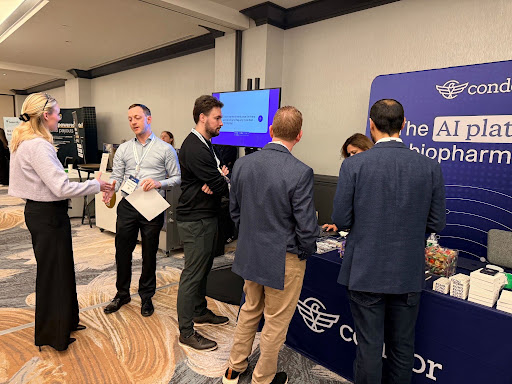
Practical AI, live on stage
That's exactly what David Towslee at Intellia Therapeutics and I set out to deliver in our session, Navigating Clinical Trials Finance: Accruals, Automation and AI Integration. Instead of slides full of promises, we ran live demos using a tool nearly everyone in the room already had on their laptops: Microsoft Copilot.
Here's what we covered.
The bottleneck is moving from the lab to the ledger
We opened by setting the table. AI is evolving faster than enterprises can adopt it. Cloud software took 12 to 14 years to become embedded in everyday work; AI is moving in roughly 90-day cycles. Waiting for a steady state before you adopt isn't a strategy at all.
That pace matters for clinical finance in a specific way. AI has already accelerated drug discovery, which means more candidates are making it into the clinic. Each of those candidates becomes a clinical trial, and each trial becomes a stack of CRO contracts, vendor agreements, and site CTAs that land on the finance team. Many teams are still running on PDFs and spreadsheets built for a lower-volume world. If those processes don't evolve, clinical finance risks becoming the constraint instead of the accelerant.
David added that the demand he sees is for speed: faster scenario planning, faster answers for strategic decisions. "You don't have a month to run back and redo your whole model," he said. "You're going to need to turn this over in a day or two in some cases."
Use case #1: CRO change order analysis
Change orders are one of the most persistent pain points in clinical finance, and the numbers explain why. Protocols with at least one substantial amendment are up 19 points over the last decade, four out of five Phase 3 protocols are now amended, and the average trial sees 3.3 major amendments. Every amendment drives downstream vendor change orders, and the average Phase 3 vendor change order runs about $535,000. For a company with eight trials in the pipeline, that can mean 40 to 50 change orders and roughly $10 million in unplanned spend.
Meanwhile, change order volume has roughly doubled while finance team headcount has stayed flat. I built change order budgets earlier in my career at a CRO, and pointed to the negotiation asymmetry: vendors can spend months building a change order, then ask the sponsor to review it in a week.
David described how his team uses AI to push back on that asymmetry. They feed multiple contract versions into an LLM and ask for a concise summary of unit changes, price changes, adds, and deletes. "AI is not giving you the answer per se," he said. "But it points you right to where you need to look. There's the data. You just need to go tell the story now."
Then I ran a live demo, loading a sample Phase 3 change order into Copilot with this prompt:
I'm a finance director at a biotech company. I've received the attached change order budget from the CRO for a Phase 3 study. Please analyze it and give me: a summary of the total cost change and the top five largest cost increases; a breakdown of direct fees vs. pass-throughs vs. investigator costs; any line items that appear to be retrospective or cover work already performed; and a list of five questions I should ask the CRO before approving this. Format the output as a brief memo I can share with my CFO.
Within seconds, Copilot summarized the total cost change, identified the largest increases, flagged potentially retrospective work, and surfaced a telling commercial observation: site count was up 54% while patient count was unchanged. It also generated sharp questions for the CRO, including why monitoring costs were rising with no increase in patients.
Use case #2: Investigator grant review
Investigator grants are nearly half of per-trial costs (48%), averaging about $6,900 per patient, and on a large Phase 3 study they can generate tens or hundreds of thousands of line items. The stakes extend to sites, too: 43% of sites report having three months or less of cash on hand, and among sites that drop out of trials, 40% cite payment delays as the primary reason.
Part of the difficulty is structural. Activity data lives in EDC, IRT, and CTMS systems, while finance sees only CRO invoices. Every site contract is formatted differently. Protocol amendments reprice studies midstream. And invoiceables often accrue in the dark until they show up on a bill. I shared the story of a mid-cap oncology sponsor that received a $5 million bill for previously unreported invoiceables at trial closeout. Automation without reconciliation just makes the wrong payment happen faster.
David's team uses AI to sift through CRO payment reports: pulling out invoiceables, comparing month-over-month balances, summarizing by site and country, and checking billed amounts against contracted rates. "It's not necessarily a capability issue, it's just time," he said.
The second demo used a similar prompt on a sample investigator grant payment report, asking for total payments by site and month, a breakdown of visit payments vs. procedures vs. invoiceable pass-throughs, any payments inconsistent with site budgets or completed visits, an estimate of what to accrue for work performed but not yet paid, and five questions for the CRO. The output caught real exceptions, including a visit performed in December but not paid until May, and standalone ECG payments without an associated visit.
Where generic AI stops
David and I were candid about the limits. A generic LLM only knows what's in the document you give it. It isn't connected to your operational systems, so it doesn't know how many patients have enrolled or how many sites are active. It can't reliably spot unlabeled retroactive work without additional context. It caps how many documents you can upload at once, which rules out analyzing hundreds of site contracts. And it's non-deterministic: I ran the same prompt the day before and got a response that was similar, but not identical.
In finance and accounting, the numbers are the numbers. That 5% difference is where teams can get into trouble. Generic AI does a great job of getting you from zero to informed, but not to defensible.
David was equally direct. Don't let AI calculate numbers you'll report without validating them. Ask for check calculations, understand how it got there, and use it for directionality and noise reduction rather than final answers.
Key takeaways
- Start with work you've already done. David's advice for building confidence: pick a month you've already closed, build a prompt that recreates your manual analysis, and confirm it matches. Then run it on the next month.
- Use reverse prompting. Iterate with the LLM until the output is exactly what you want, then ask it to write the prompt that would get you there next time. Save it and reuse it.
- Build a shared prompt library. David's team spends about 10 minutes of every team meeting discussing how they're using AI, and maintains a library of common prompts, such as variance analyses, that anyone on the team can adapt.
- Make time to experiment. Our team runs quarterly hackathons: a few hours on a Friday afternoon to identify a problem, build an AI solution, and test it together.
- Try the in-app plugins. David's single recommendation for Monday: experiment with AI plugins in Word, Excel, and PowerPoint. Seeing changes happen live, and iterating in real time, is far faster than the old prompt-wait-revise loop.
- Check your AI policy first. Before putting confidential data into any tool, confirm it's licensed and approved by your IT team. Enterprise plans from the major providers generally don't train on your data; free tools may not offer the same protections.
- Weigh build vs. buy honestly. Homegrown tools can be tailored to your workflows but depend on IT bandwidth. Purpose-built platforms bring connected data, auditability, and rigorous security. The right answer depends on your resources and how far you want to go.
Helping the industry get started, and scale
The questions we heard in Boston are the ones we hear from R&D teams every week: Where do I start? How do I trust the output? How do I go from one-off prompts to something repeatable? Our goal is to keep answering them with practical, hands-on guidance that clinical finance teams can put to work right away, whether or not they're Condor customers.
A big thank you to David for joining Jeff on stage and sharing so openly, and to everyone who attended and asked great questions.
Go deeper
Here are the slides from our presentation. Once we get the recording from Informa, we’ll add that here too.
If you want to keep exploring practical applications of AI in clinical finance, start here:
Read the article
Reimagining Investigator Grants with AI
Here's what we keep hearing from clinical finance and ops teams: "I know we need to be doing something with AI. I just don't know how to start. Can you share practical, hands-on examples of how to use AI in clinical finance?" That question is why we kicked off our webinar series, Practical Applications of AI in Clinical Finance & Ops. It's built around one simple premise: real use cases, real workflows, real results. No theory, no hype, just what actually works.
Our first session tackled CRO change orders. Our latest webinar took on the biggest line item in almost every clinical budget: investigator grants.
Here's the webinar recording.
Why Focus on Investigator Grants?
Investigator grants aren't a line item you can afford to get wrong. On average, site payments for administrative fees and patient visits account for roughly 48% of total per-trial cost. The average investigator grant runs about $6,900 per patient across therapeutic areas, and oncology trials push that closer to $18,700 per completed patient. On a study of any real size, that's tens of thousands of individual transactions, each one needing to be verified against whether the activity actually happened and whether the invoiced amount matches what was contracted.
The people on the other end of those payments can't absorb your payment terms. Sites paid on a monthly cycle wait an average of 45 days to be reimbursed for work already performed. On quarterly terms, that stretches to 137 days, nearly three times the wait for the same work. Forty-three percent of sites report three months or less of operating capital in the bank, and CTTI estimates that 40% of site dropout is tied to payment delays. Twenty-three percent of sites report delays of 90 days or longer. Payment accuracy isn't a back-office hygiene issue. It's site relationship and enrollment risk.
Grants are also just structurally hard to get right. The activity and the money live in different systems: your EDC knows which visits happened, but finance typically only sees the invoice and payment files, with no line-by-line reconciliation between the two. Every site contract is its own snowflake of rates, invoiceable procedures, screen-fail caps, holdbacks, and overhead, all buried in contract PDFs that range from clean to, frankly, illegible. Protocols now average 3.3 substantial amendments, and each one can reprice visits and admin fees mid-study. And invoiceables like screen failures and unscheduled visits often accrue in the dark, surfacing all at once as a true-up at closeout instead of being tracked as they occur.
Most sponsors respond by outsourcing grants management to a CRO or payments vendor, and that's often the right call. CROs bring dedicated staff, global payment rails, and the ability to manage hundreds of site relationships at once so you don't have to build that function internally. But outsourcing the work isn't the same as outsourcing the accountability. Payments are frequently a low-margin, pass-through afterthought inside a much larger CRO contract, and you're trusting a vendor to approve, calculate, and report on its own work. When your auditors and your board have questions about the numbers, they're asking you, not your CRO.
We shared two stories from the field that show what happens when convenience wins out. In the first, a top-five global CRO replaced its investigator payments team with an automated pay platform that auto-paid every invoice it received. Sites started getting checks for patient visits that hadn't happened yet, and it took months to unwind the confusion. In the second, a mid-cap oncology sponsor closed out a trial and received a $5 million bill from its CRO for invoiceables that had never been tracked or accrued along the way. The money had already been spent; the sponsor was simply the last to find out. Automation without reconciliation just makes the wrong payment happen faster.
How to Reimagine Investigator Grants with AI
To show what's actually possible today, we ran the same investigator grant payment report through two very different tools: Microsoft Copilot, something most finance teams already have access to, and Condor's purpose-built platform.
Using Microsoft Copilot
Jeff started by dropping a CRO investigator grant payment file, covering the last two quarters of a phase 3 study, into Copilot with the following prompt:
I'm the head of clinical finance at a biotech company. Attached is the investigator grant payment report from our CRO for our phase 3 study covering the last two quarters. Please analyze it and give me: total payments by site and month, highlighting the five highest-paid sites; a breakdown of visit payments versus procedures versus invoiceable pass-through line items; any payments that look inconsistent with each site's contract budget or with the visits patients actually completed; what we should accrue for work sites have performed but not yet been paid for; and five questions I should ask the CRO before approving the next payment run. Format the output as a brief memo I can share with my CFO.
Two things make this prompt work. First, it's specific about exactly what the output should contain, since a general ask invites the model to fill gaps with something that merely looks credible. Second, it gives the model context on audience and intent, telling it who's asking and who the memo is for, so it knows what level of detail and framing to use.
Copilot came back with a clean executive summary: roughly $270,000 in payments, weighted toward startup activity and pass-through costs consistent with early enrollment, no obvious duplicate payments, but several items flagged for CRO follow-up. It broke out the top five paid sites, plotted payments by month, and split the mix between visits, procedures, and invoiceable pass-throughs. It flagged a 4-5 month lag between when sites performed visits and when they were reimbursed, and called out specific items, like a biopsy and imaging reimbursement paid before the associated screening visit, and ECG charges appearing months after their related visits.
For a tool that's already sitting in most people's Microsoft 365 license, that's a genuinely useful starting point: a fast, readable summary, clean per-site totals, catches on the obvious duplicates and outliers, and a CFO-ready memo in seconds with zero procurement.
But here's where it stops. Copilot can't see the EDC, so it can't tie a payment to a visit that actually happened. It doesn't know the contracted rates, caps, holdbacks, or overhead in the site agreements, so it has no way to know whether a flagged charge is actually wrong. The accrual figure it generates is an extrapolation of past payments, not a measurement of completed activity, and it can't distinguish an early payment from an unearned one. Run the same prompt twice and you may get a different answer, with no evidence trail behind either one. It reads the payment file. It cannot read the trial.
From "What the File Says" to "What's True": The Condor Demo
Nim then walked through the same investigator grant scenario inside Condor. Instead of reasoning from a single spreadsheet, Condor's Intelligence Engine reconciles patient-level activity, visits, procedures, and site admin fees coming from the CRO, directly against the EDC data sponsors already have, using AI to map each payment to the business context behind it. The system proposes the mapping automatically; nothing overrides a user's judgment without review, but the matching itself doesn't require anyone painstakingly reconciling line by line.
Once that file is imported, two things change. The overview surfaces CRO and site performance alongside payment reconciliation, flagging missing invoices and overbilling immediately and pointing to which sites need attention. And a trend layer goes beyond flagging individual discrepancies to surface patterns: what share of spend is startup versus investigative, which sites show unusual or no activity, and how performance is trending over time, the exact kind of history and pattern-matching a generic LLM has no way to see. From there, users can drill into the raw patient data, overlay it against processed EDC data in native currency or USD, and investigate a specific negative variance down to the site, visit, procedure, or admin fee level.
The platform is built around four core principles: the full story lives in one place instead of scattered across systems; overbilling, missing invoices, and pricing issues are visible at a glance instead of requiring a manual dig; discrepancies and off-contract charges are flagged as they appear; and everything is oriented toward decision support, so teams spend less time combing through data and more time acting on it.
Mapped back to the two stories from earlier in the session: the auto-pay trap becomes activity matching, every payment tied to a corresponding EDC event, so a payment with no visit behind it is caught before it goes out the door instead of after. And the closeout surprise becomes continuous invoiceables tracking, watching that spend accrue monthly as it happens, so it becomes a line item you tracked all along rather than a bill that shows up at the end.
What We Heard From the Room
Several attendees asked some version of, "If I upload my EDC and contract data into Copilot and structure the prompt correctly, can't I get there myself?" Short answer: to a point, yes, but volume becomes the constraint fast. Most general-purpose tools cap how many documents you can attach to a single prompt, well short of the dozens or hundreds of contracts a real trial generates. Without a knowledge graph or ontology behind it, there's no guarantee you get the same answer twice.
On data sources, Condor works from whatever level of detail a CRO provides, whether that's an accrual report or the underlying invoices, and the more detail available, the more granular the mapping. Unmapped invoiceables and procedures are clearly flagged in the reconciliation table so they can be reviewed and remapped rather than silently dropped. Protocol amendments are handled by loading the full history of a site's CTA, so a visit performed before an amendment's effective date is recognized at the old rate and everything after at the new one, even across sites with seven or eight amendments over a study's life. The platform supports full multi-currency and FX conversion, any therapeutic area, and, per attendees who asked directly, no cap on site count. Some phase 3 oncology trials on the platform run 500-plus sites, each with its own contract history, and international sites are handled the same way as domestic ones, loaded through automation and human-in-the-loop review into the same normalized EDC and contract structure.
What's Next in the Series
This is only our second session, and we've already received multiple topic ideas from attendees. Our next webinar will be in early October, and we’ll share the topic soon.
In the meantime, if you'd like to see what Condor can automate for your investigator grants process specifically, book a demo with our team here.
Read the article
Reimagining CRO Change Order Management with AI
Here’s what we keep hearing from clinical finance and ops teams:
"I know we need to be doing something with AI. I just don't know how to start. Can you share practical, hands-on examples of how to use AI in clinical finance?"
The answer is yes, absolutely. To help, we’ve kicked off a series we call Practical Application of AI in Clinical Finance & Ops. It’s built around one simple premise: real use cases, real workflows, real results. No theory or hype. Just what actually works.
Our first webinar focused on the three levels of AI maturity, the AI mindset teams must have to successfully implement and scale AI, and how AI is evolving and what that means for pharma clinical finance and ops teams.
Our latest webinar focused on reimagining CRO changes order management with AI.
Why Focus on CRO Change Orders?
If you work in clinical finance or clinical operations, you don't need convincing on this one. Change orders are one of the most painful, recurring problems, and the data backs up what everyone already feels. Substantial protocol amendments, which are the main trigger for change orders, have gone from affecting 57% of trials a decade ago to 76% today. In Phase 3, it's 82%. On average, a Phase 3 change order runs $535,000, which is close to four times the Phase 2 figure, and takes about three months to negotiate.
Scale that across a typical portfolio, say eight active studies, and you're looking at 40 to 50 change orders across the portfolio, including ancillary vendors. That represents $10 million or more in unplanned, unbudgeted costs. Meanwhile, change order volume has roughly doubled over the past decade, while finance headcount at a typical biotech has stayed flat. That gap gets closed one of three ways: with tooling, headcount, or with weekends.
On top of the volume problem, change orders are just hard to review. The explanations on each line item are often a sentence or two. CROs sometimes lowball the initial bid, knowing the change order process is where they recover margin. And retrospective work, cost for activity that already happened, routinely shows up buried in a document you're given a week or two to evaluate. It's a lot of financial exposure moving through a process with very little tooling behind it. That combination of high stakes and low tooling made it the obvious place to start.
How to Reimagine Change Order Management with AI
In the webinar, we walked through the same change order budget three different ways: first with generic AI, Microsoft Copilot. Then with Condor's purpose-built AI, Talon. And finally by flipping the process entirely and modeling the scope change in Condor before the CRO's document even arrives.
Using Microsoft Copilot
One of the most common requests after the panel was for something people could go use immediately. If you have Microsoft 365, you already have Copilot, and that's genuinely a useful starting point for a first pass at any change order. Here's the exact prompt we used in the webinar:
"I'm a finance director at a biotech company. I've received the attached change order budget from a CRO for a Phase 3 study. Please analyze it and give me a summary of the total cost change and the top five largest cost increases, a breakdown of direct fees versus pass-through costs versus investigator costs, any line items that appear to be retroactive or cover work already performed, and a list of five questions I should ask the CRO before approving this change order. Format the output as a brief memo I can share with my CFO."
A few things worth noting about why this prompt works: it gives the model a role ("I'm a finance director"), a specific task, and a defined list of deliverables. The more context you give a general-purpose model before you hit send, the better the output. Attach your change order file, run this, and in under a minute you'll have a readable first-pass memo.
Just know where it stops. A general-purpose tool can tell you what a document says. It can't tie units back to your original contract, it has no knowledge of your protocol history, and it won't reliably catch unlabeled retroactive work. It gets you from zero to informed. It doesn't get you to defensible. That's the gap purpose-built, ontology-driven tools like Talon are built to close, and it's why the answers looked meaningfully different once we ran the same budget through a model that actually understood the contract underneath it.
From "What Changed" to "What's Wrong": The Talon Demo
That's the gap we closed with the next demo. I ran the exact same change order budget through Talon, an AI-powered service offering we’re rolling out to customers, which has our clinical and financial ontology built into it. Instead of just summarizing what changed, Talon made judgment calls on every line item: it flagged that roughly 94% of the total dollar delta was unjustified, inadequately supported, or needed clarification, and sorted every line into a clear disposition, hard no, negotiate, needs clarification, or accept. It landed on a negotiation target of $1.4 to $1.7 million in recoverable savings, with a realistic settlement range of $556,000 to $856,000 given how CROs typically respond to pushback.
The reasoning behind that is what makes it useful. On the largest cost driver in the change order, added monitoring visits, Talon explained that monitoring spend is mechanically tied to patient volume, not site count, and since patient counts hadn't changed, the increase didn't hold up. It reverse-engineered the expected cost from the original contract's drivers (per-patient procedures, per-site fees) and showed the gap between that and what the CRO was billing, with every finding linked back to the source cell in the change order budget grid. Microsoft Copilot told us what the document said. Talon told us what it was hiding, and gave us a negotiation brief to send back to the CRO.
Getting Ahead of the Change Order Entirely: The Condor Scenario Planning Demo
The last demo flipped the sequence altogether. Instead of waiting for a CRO's change order and then analyzing it, I modeled the scope change myself, before any document arrived, directly in Condor's production environment. I typed a plain-language prompt asking the system to forecast a scenario for the study: expand from seven to 11 sites, keep the 48-month duration and hold patient counts flat, then show the incremental cost against the current $10.67 million contract value.
Condor's forecasting agent built that scenario in real time, referencing the study's actual contract structure and cost drivers, and landed on a $629,000 incremental increase. Compare that to the $2 million-plus the CRO's change order was requesting for the same scope, and the gap tells you everything: once you strip out costs that shouldn't move when patient volume doesn't (like a big chunk of that monitoring spend), the real cost of the change is a fraction of what was billed. That's the value of scenario planning: you walk into the negotiation with your own independent number already in hand, instead of reacting to whatever number the CRO sends first.
Here’s the webinar recording.
We’ve trimmed the Talon and Condor demos from it. Want to see all the demos, and see what this looks like with your own data? Book a demo with our team here.
What's Next in the Series
As I mentioned, this is the second of several webinars and workshops in our Practical Applications of AI in Clinical Finance & Ops series. We polled attendees live during the webinar on what they wanted to see next, and the results were clear. Here are a few of the topics we’ll cover:
- Monitoring vendor spend pacing against contract value and identifying anomalies in vendor invoices (the top pick)
- Building a first trial budget from a protocol
- Building an AI prompt library for your clinical finance team
We'll be running these both as webinars and as in-person live workshops at upcoming industry events, where you can bring your laptop and work through the exercises with us in real time. Stay tuned for updates!
Read the article
Managing Upfront Payments: From RFP to Reconciliation
In clinical trials, Contract Research Organizations (CROs) often request upfront deposits or retainers for various expenses. These deposits, though common, are sometimes overlooked during contract negotiation. However, understanding and monitoring these amounts can save your company significant money and prevent cash from being unnecessarily tied up in the study. Large upfront payments are effectively interest-free loans to the CRO—it’s essential to manage them wisely.
Types of Upfront Payments
- Direct Fees
- Purpose: These upfronts are used to manage cash flow and float CROs for services they perform, usually under unit-based contracts where payment is made in arrears.
- How it works: The deposit is held until the end of the study and credited back toward final invoices as services near completion. The amount of the deposit can fluctuate with changes in the trial budget when a change order is executed—additional upfronts may be requested when the budget grows. Similarly, reduced upfronts are possible when services are downscoped. If you have a change order where the services budget is reducing, you should request a reduction to the deposit as well!
- Key Insight: Because these upfronts are used for a measurable purpose, to manage cash flow and float the CRO, it’s very easy to gauge the reasonability of the upfront being requested using a simple formula: (Total CRO Services Budget÷Contracted Days)×(1 month+payment terms)
- For a $1M budget over a 2 year timeline (730 days) with 30 day payment terms (60 day float), the required upfront should be $84,269.
- Pass-Through Costs
- Purpose: These upfronts cover start-up costs for third-party vendor contracts managed by the CRO and also as a float for all other pass through costs incurred by the CRO.
- How it works: The portion of the deposit related to vendors is typically applied to the first few invoices pertaining to third-party vendors managed by the CRO. The remaining deposit pertaining to all other pass through costs are either:
- Held until the end of the study, similar to the Direct Fees upfront, or
- Amortized—with an equal portion drawn down and applied to each pass-through invoice over the study's duration.
- Key Insight: Ensure that the portion of upfront payments related to third-party vendors is limited to true upfront costs. CROs, being risk-averse, may attempt to secure a larger portion of the third-party vendor budget in advance. However, most vendor agreements, such as EDC contracts, should be amortized over the full duration of the trial—paying the entire amount upfront is usually unnecessary.
- Investigator Grants/Site Payments
- Purpose: These rolling deposits cover patient fees and site-related administrative costs.
- How it works: Replenished on a typical cadence, usually quarterly, they ensure cash flow is maintained for site payments.
- Key Insight: CROs may request inflated amounts to maintain a cash buffer for unforeseen site expenses. In more extreme cases, they might propose a blanket deposit without conducting a proper analysis to determine its reasonableness, leading to funds being held unnecessarily for months, or even over a year. It’s crucial to evaluate whether the requested upfronts are justified and align with projected enrollment and protocol costs.
Key Considerations
- When Are Upfronts Applied? Upfronts can be applied to initial invoices, held in escrow, or reserved for the trial’s conclusion.
- Communication with Vendors: Open communication ensures upfront management is transparent and aligned with expectations.
- Final Reconciliation: CROs should reconcile and apply any remaining upfront balances to final invoices before closing out the study. Tracking this ensures CROs remain accountable and don't profit from retained upfronts.
By thoroughly understanding and managing upfront payments, you can prevent unnecessary financial strain, ensuring your funds are allocated where they’re truly needed throughout the clinical trial.
Read the article